HomeKit Weekly: The Airversa QliQ brings a rechargeable Thread smart button to Apple Home


Smart buttons have become incredibly common in the Apple Home ecosystem, but finding one that checks every single box is still surprisingly challenging at times. The new Airversa QliQ immediately caught my attention because it addresses two of my biggest complaints about most smart switches: it uses a Thread connection instead of Bluetooth, and it ditches disposable coin batteries for a rechargeable one. Let’s take a closer look at what it brings to the table and see if its premium hardware features justify the purchase.
HomeKit Weekly is a series focused on smart home accessories, automation tips and tricks, and everything to do with Apple’s smart home framework.
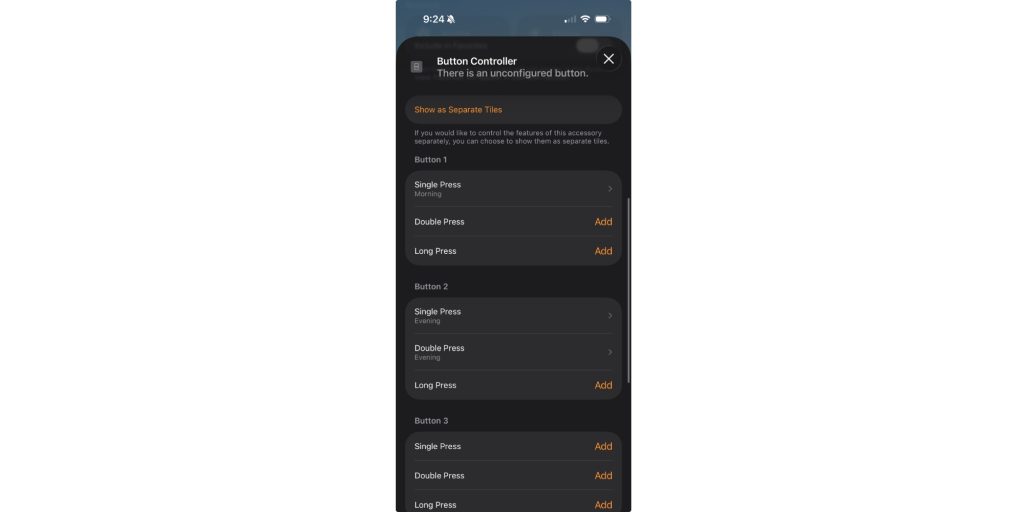
At its core, the Airversa QliQ is a 3-button controller that lets you trigger up to 9 automations with single, double, and long presses. That gives you plenty of flexibility to trigger a simple light toggle or a complex morning scene that opens the curtains, turns on the lights, and starts playing Music. However, the connectivity and the accessibility features surrounding those buttons are what actually make this device worth the cost.
Tech specs
- Battery and power: The Airversa QliQ has a built-in rechargeable battery that lasts up to two months on a single charge. It has a USB-C port at the bottom, and a red LED indicator shows when the battery is empty.
- Connectivity: It operates over Thread. You will need a Thread-enabled Apple Home hub, like an Apple TV or HomePod mini.
- Design and usability: The 3-button design offers single-click, double-click, and long-press actions. The Airversa QliQ also has built-in tactile and audible feedback. Each press gives you a slight vibration and a beep, which is a fantastic usability feature.
- Mount: It includes a magnetic wall plate allowing you to snap the Airversa QliQ directly onto any magnetic surface.
How to onboard
Since this button uses HomeKit over Thread, setup is incredibly straightforward and fast. You do not need to download a third-party app or create a new account to get it working. You simply scan the HomeKit code directly in the Apple Home app, assign it to a room, and start programming the buttons. Airversa offers an app for customizing features, such as disabling the beep or vibration, but this is completely optional for the core functionality.
Use case ideas
Having nine different triggers on a single remote opens up a lot of possibilities in Apple Home. You can attach the magnetic plate next to your front door and use a long press on the top button to trigger your Arrive Home scene, turning on the entryway lights and setting the temperature
I love using these for highly specific environmental controls. I could easily dedicate the middle button to trigger a reading scene, dimming the lamp lights near my recliner when I finally sit down to read a book (currently this). You could also keep it on your nightstand to trigger a Bedtime scene that locks the doors, turns on your alarm system, turns off all the house lights, and lowers the thermostat.
Wrap up on the Airversa QliQ
In my experience over the past few weeks, the Airversa QliQ justifies its place as a great Apple Home remote. Ditching disposable batteries for a rechargeable USB-C setup is great, and the Thread connectivity means your automations run really fast. I really like the feedback/vibrations on the button as well.
You can buy the Airversa QliQ in a single or 2-pack directly from Amazon.


Схожі новини

Apple завершує розробку навушників із вбудованими камерами - Bloomberg
I built GitHub Store to 12,500 stars in 6 months – I started at 16
Tech Now
