Apple Sports now works with CarPlay, here’s how to set up
Good news for sports fans: Apple has updated its Sports app for iPhone, adding new support for CarPlay alongside more F1 race-tracking features.
Apple Sports on CarPlay now goes beyond Live Activities
Apple Sports version 3.10 includes the first persistent Apple CarPlay features.
While there’s no dedicated app, Apple Sports now includes multiple widgets that work with CarPlay.
Apple’s Sports app supports two small widgets in the car: My Teams and Leagues.
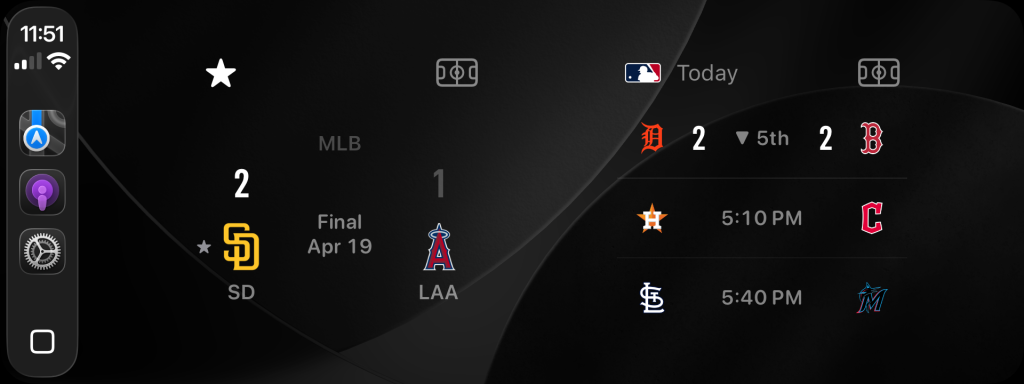
Before now, Apple Sports only appeared in CarPlay as a Live Activity during a game or event.
How to set up Apple Sports widgets in CarPlay
Apple Sports widgets for CarPlay can be configured on iPhone after updating to version 3.10 of the app.
You can set up widgets on CarPlay from the Settings app on iPhone: Settings > General > CarPlay > My Car > Widgets.
From here, you can add a widget from the Sports app to a CarPlay widget stack.
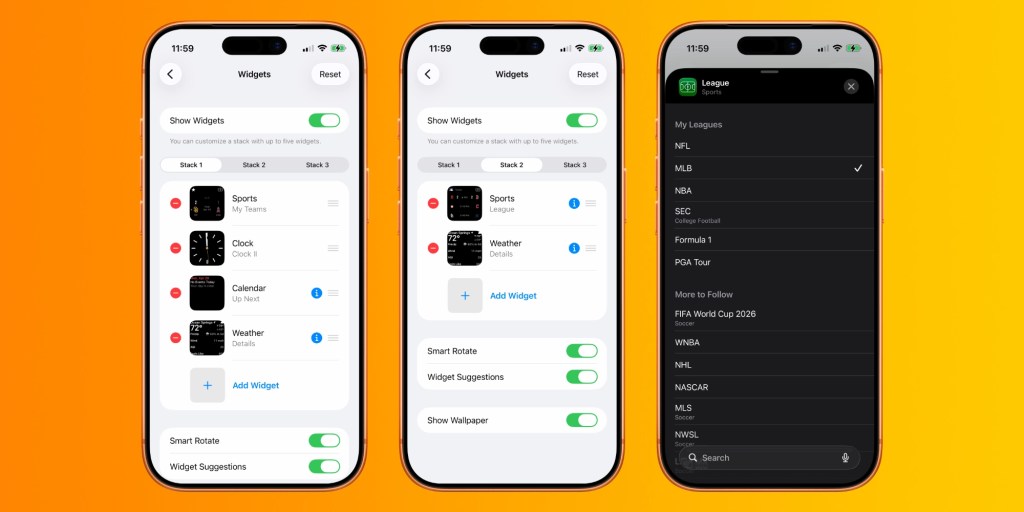
Teams that appear in the My Teams widget are based on which teams you favorite in the Sports app on iPhone.
The Leagues widget is configurable from the CarPlay widget settings screen. Tap the “i” icon to toggle which leagues appear for the CarPlay widget.
CarPlay can display one, two, or three widget stacks — depending on your car. The number of stacks displayed is based on the screen resolution of your car display.
You may be able to show an additional widget stack by enabling Smart Display Zoom. This toggle is found under the Display section of the Settings app in CarPlay.
On iPhone, Apple Sports includes four more widgets with medium and large versions of My Teams and Leagues.
New F1 features and World Cup tracking
Apple Sports also gains new F1 tracking features as part of the new update.
“Now F1 fans can see weather conditions for each Grand Prix,” Apple says in the release notes. “Check track temperature, wind speed, and more.”
Those new Apple Sports CarPlay widgets will go great inside F1 cars, right?
The release notes also mention the recently revealed 2026 World Cup tracking capabilities:
Get ready for World Cup 2026 — follow your favorite teams and explore the groups on Apple Sports before the tournament kicks off in June.
Apple Sports for iPhone is available for free on the App Store.
Do more with your Apple products
Apple AirTag 2 | Add Find My tracking to keys, bags, bikes, more
Beats USB-A to USB-C Cable | The official CarPlay cable
Wireless CarPlay Adapter | No more plugging in required
AirPods 4 | Apple’s most affordable wireless headphones
Astropad Rock Paper Pencil | iPad screen protector + Apple Pencil tips
Схожі новини
The misunderstood sex chromosome: how X affects your health
Durability key in school backpack sales in Japan
Germany news: Lufthansa scraps 20,000 flights