Apple @ Work: ASBMUtil brings a native macOS app to the Apple Business experience

Apple @ Work is exclusively brought to you by Mosyle, the only Apple Unified Platform. Mosyle is the only solution that integrates in a single professional-grade platform all the solutions necessary to seamlessly and automatically deploy, manage, and protect Apple devices at work. Over 45,000 organizations trust Mosyle to make millions of Apple devices work-ready with no effort and at an affordable cost. Request your EXTENDED TRIAL today and understand why Mosyle is everything you need to work with Apple.
Apple Business and Apple School Manager are foundational to modern Apple device deployments. If you are deploying Macs, iPads, or iPhones in the enterprise, you spend a lot of time in these portals. The problem is that the web interface can be incredibly tedious when you are dealing with thousands of devices. As we’ve mentioned a few times, Apple released an official API for these services last year, opening the door to automation and new tools. A new native macOS app called ASBMUtil is one such example.
About Apple @ Work: Bradley Chambers managed an enterprise IT network from 2009 to 2021. Through his experience deploying and managing firewalls, switches, a mobile device management system, enterprise-grade Wi-Fi, 1000s of Macs, and 1000s of iPads, Bradley will highlight ways in which Apple IT managers deploy Apple devices, build networks to support them, train users, stories from the trenches of IT management, and ways Apple could improve its products for IT departments.
Bringing the API to the desktop
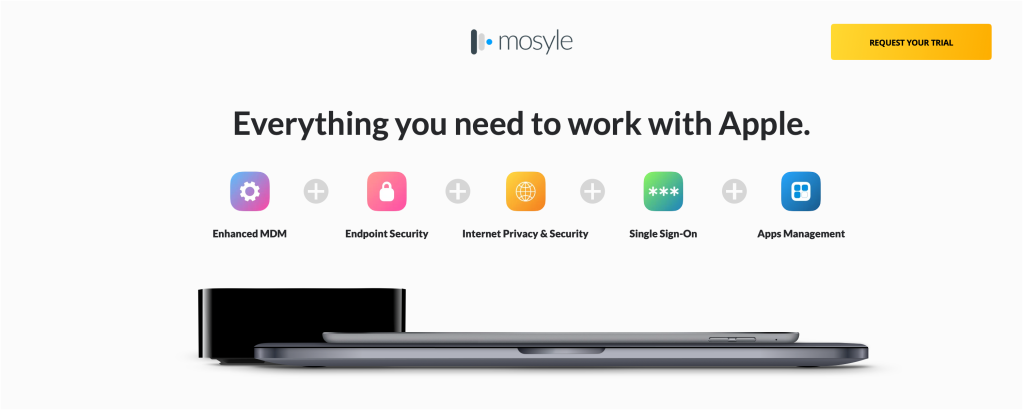
Rod Christiansen recently launched ASBMUtil, a native SwiftUI front-end built to interact with your Apple enterprise tools. Instead of wrestling with JSON and terminal commands, Mac admins can now interact directly with the Apple Business API through a native app on their Mac.
The main view is a single native table with every managed device in your Apple Business and School Manager account. Macs, iPads, iPhones, and Apple TVs are all displayed right next to each other. If you click a row, a sidebar slides in with the full device details, including the serial number, order status, device management assignment, AppleCare coverage, and MAC address. You can easily select a handful of devices, right-click, and reassign them.
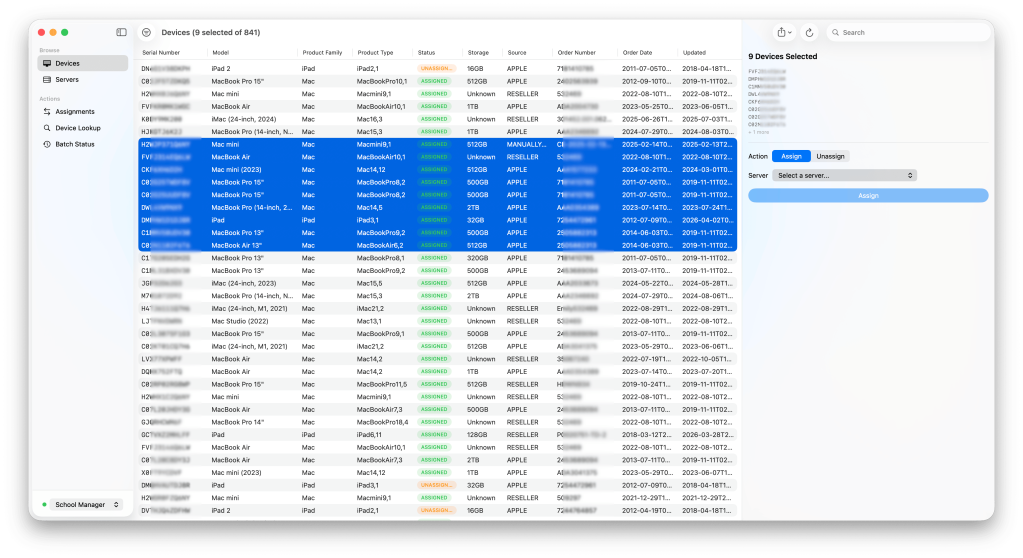
- Device browser: You can view all managed devices in a single paginated, sortable table with a details sidebar.
- Powerful filters: You can filter by device status, order number, model family, or device management server. You can also stack filters to narrow down the view to the exact devices you need.
- MDM server list and assignments: This lets you see every server and which devices are currently assigned to it.
- Bulk assign and unassign: You can select multiple devices in the table, pick a destination server, and apply the change. You can also import a CSV if that is how your desired state arrives.
- Export to CSV or JSON: You can push your selection or filtered results out through the macOS share sheet.
- Multi-profile switching: If you manage multiple Apple environments, you can easily flip between different Apple Business and Apple School Manager instances from the sidebar and manage your credentials in the settings.
Christiansen has also kept the app perfectly in sync with Apple’s recent API additions. The app supports AppleCare coverage lookups (API 1.3) and can pull Wi-Fi, Bluetooth, and built-in Ethernet MAC addresses for macOS (API 1.4), as well as iOS, iPadOS, tvOS, and visionOS (API 1.2). Most recently, the app added support for API 1.5, which includes an array format for MAC addresses on devices with multiple network interfaces.
9to5Mac’s take
I love this app! I bounce in and out of Apple School Manager daily, and having this right on my dock is a huge time saver. If you manage an Apple fleet, ASBMUtil is a utility you should absolutely add to your toolkit. You can grab the latest release directly from GitHub.
Apple @ Work is exclusively brought to you by Mosyle, the only Apple Unified Platform. Mosyle is the only solution that integrates in a single professional-grade platform all the solutions necessary to seamlessly and automatically deploy, manage, and protect Apple devices at work. Over 45,000 organizations trust Mosyle to make millions of Apple devices work-ready with no effort and at an affordable cost. Request your EXTENDED TRIAL today and understand why Mosyle is everything you need to work with Apple.


Схожі новини
Franciscan order with 300 flats in Madrid preaches poverty and evicts elderly man

Трактор на швидкості протаранив будинок: невідомі в балаклавах втекли на авто