Adobe Photoshop update brings on-device AI processing, but there is a catch


Adobe released Photoshop version 27.7 today, and one of the most interesting additions is an on-device AI model for the Remove tool that, alas, comes with rather steep hardware requirements. Here are the details.
On-device processing limited to more powerful Macs
Headlining today’s release notes of Adobe Photoshop 27.7 is an interesting tidbit on the Remove tool:
- On-device AI model for Remove tool
- Photoshop now supports an on-device AI model for Remove tool, allowing object removal without cloud processing. Users can:
- Process edits locally after download
- Download, cancel, or remove the model at any time
- Hardware compatibility is checked automatically before download
- Switch between cloud and on-device processing
This means users can rely on the AI-powered Remove tool even if they don’t have an active internet connection.
What’s more, on-device models are generally preferred for privacy reasons, as the information never needs to leave the device for processing.
Of course, local AI processing is only as good as the hardware it runs on. And that’s where the catch comes in.
Here’s Adobe on the bad news:
The Remove tool supports an on-device model that processes edits locally on your device. This option is available when you select Device mode and requires the following minimum hardware configurations.
Component Minimum hardware requirements Processor Apple silicon Mac with M1 Pro or later Memory (RAM) 24 GB or more Operating system macOS Tahoe (version 26.4) or later
This means that for Macs that fall outside these minimum requirements, the Device option is grayed out, leaving users only with the cloud-based (but still powerful) version of the AI-powered Remove tool.
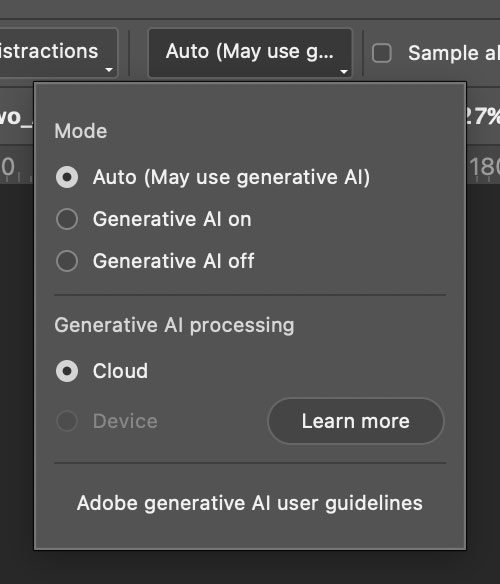
Also included in today’s feature updates are:
- Photoshop desktop and Firefly Boards integration
- Share any Photoshop document directly to Firefly Boards by creating a new board or adding to an existing one, from the Share panel and the Export menu.
- Firefly Boards is now surfaced in the Variations panel as a destination for moodboarding and comparison of AI-generated variations.
- Open generated image variations with Ideate in Firefly Boards in a preconfigured Board layout for further exploration and iteration.
- New guided workflows help createmoodboards and visual concepts, branding and marketing assets, and social media content.
- Ungating premium generative AI features
- Expanded access to premium generative AI features for eligible subscribers. Existing generative credits can now be used across both standard and premium generative AI features.
- Unified Account Menu in the Edit workspace
- View and manage your Adobe account, subscription details, and generative credits directly from the Edit workspace through the new Unified Account Menu.
To learn more about the updated Remove tool on Adobe Photoshop version 27.7, follow this link.
Worth checking out on Amazon
- David Pogue – ’Apple: The First 50 Years’
- MacBook Neo
- Logitech MX Master 4
- AirPods Pro 3
- AirTag (2nd Generation) – 4 Pack
- Apple Watch Series 11
- Wireless CarPlay adapter


Схожі новини
BOJ should raise policy rate at appropriate pace, says board member Junko Koeda

OpenAI's AI solves 80-year-old maths problem, marking major breakthrough